


TRADE COMPLIANCE RMA INSTRUCTIONS
1. Foreign Shipper Instructions: Shipping an Item to TDSI (IMPORT into US)
Mandatory Pre-Alert:
- All shipments require approval by TDSI Trade Compliance.
- Please email TDSI Trade Compliance, at tcg@thalesdsi.com, a copy of your invoice (e.g., proforma, commercial invoice, etc.) which must cite the RMA # and the following information for each item (country of origin, HS codes, part number(s), serial number(s), and values).
- Once you receive approval from Trade Compliance, please email tcg@thalesdsi.com the tracking number if available, or send as soon as it is received, before the items go to customs.
- NOTE: If using FedEx, please ensure BROKER SELECT OPTION (BSO) is selected when creating the shipping label, the BROKER SELECT OPTION MUST BE ON THE LABEL (See below example)
- If TDSI does not receive a pre-alert and broker select is not chosen when using FedEx, the shipment may be returned to sender by FedEx, at the shipper’s expense.
PLEASE MAKE SURE APPROPRIATE PERSONNEL ARE MADE AWARE OF THESE INSTRUCTIONS. CONTACT tcg@thalesdsi.com with any questions.
2. TDSI Shipping Repaired Item back to Customer (REEXPORT From U.S.)
At the time of the above pre-alert, customer to also provide the following information, such as:
- If weights/dims need to be reflected on the commercial invoice or packing slip
- If both repair value and actual item value needed to clear customs
- Any special identifier numbers (i.e. CNPJ # for customers in Brazil)
- POC name and email if pre-alert is required prior to shipping of RMA
CREATING A FEDEX LABEL WITH BROKER SELECTION OPTION
When creating the label, proceed as you normally would, but one additional step will be needed (it will look like below). Please choose the Broker Select box. A pop-up may appear and you will click PROVIDE DETAILS. Please enter our broker information.
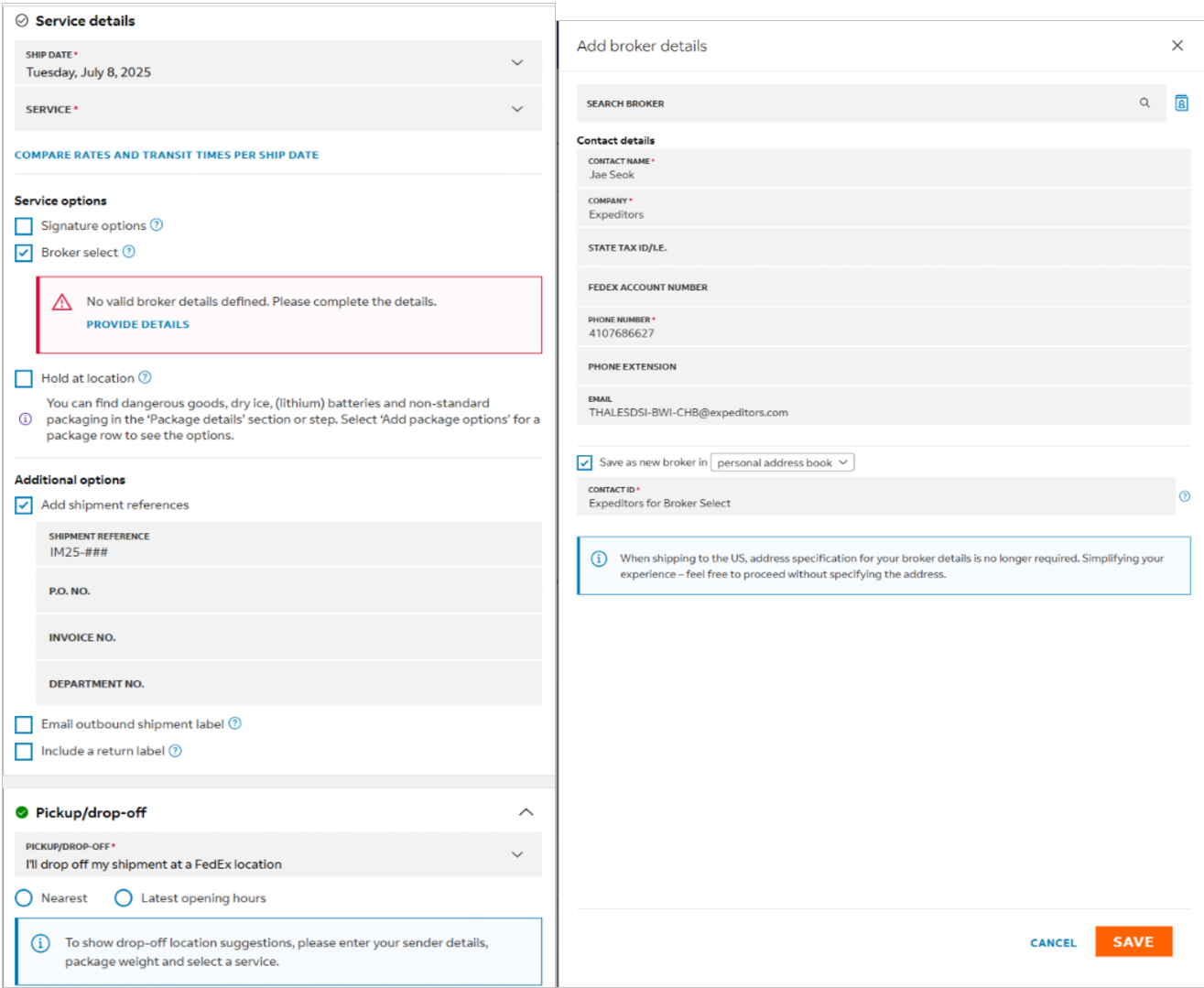
You are able to save the broker details as a contact so that you do not have to type it in each time.